![DentalMarketing-Logo2-White copy.png]](https://grow.dentalmarketing.com/hs-fs/hubfs/DentalMarketing-Logo2-White%20copy.png?height=40&name=DentalMarketing-Logo2-White%20copy.png)
Video walkthrough on how-to grant access |
Step-by-Step Guide for Granting Access |
1. Navigate to your Wix site's dashboard in your account
2. Go to 'Settings', select 'Roles & Permissions'
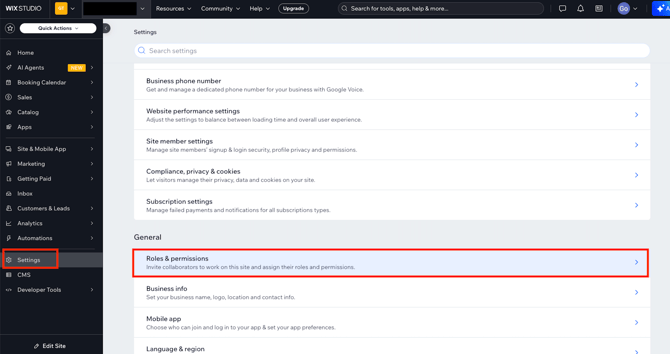
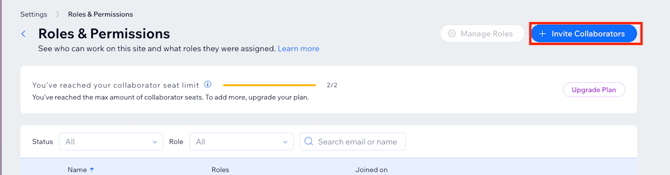
3. Click 'Invite Collaborators'
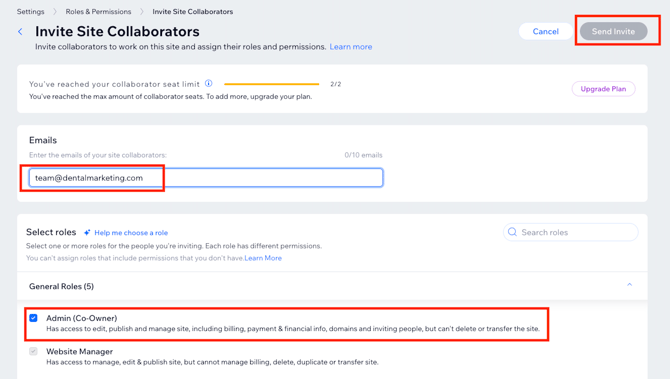
4. Enter the email address, team@dentalmarketing.com, click the "Admin" for full access, and click 'Send Invite'
5. Confirm via email when you have granted DentalMarketing access so our team ensure we have the proper access.
Why does DentalMarketing.com need access?
We need domain access to launch your website once it’s complete (if applicable) and to make any necessary updates to your DNS records, ensuring your site functions correctly. Domain access is also required to set up Google Search Console for proper site tracking and performance monitoring.