![DentalMarketing-Logo2-White copy.png]](https://grow.dentalmarketing.com/hs-fs/hubfs/DentalMarketing-Logo2-White%20copy.png?height=40&name=DentalMarketing-Logo2-White%20copy.png)
- Log into Google My Business under https://business.google.com/
- Open the business listing that you would like to grant access to
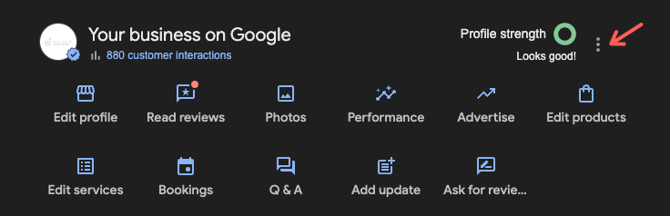
- Click the 3 dots next to 'profile strength'
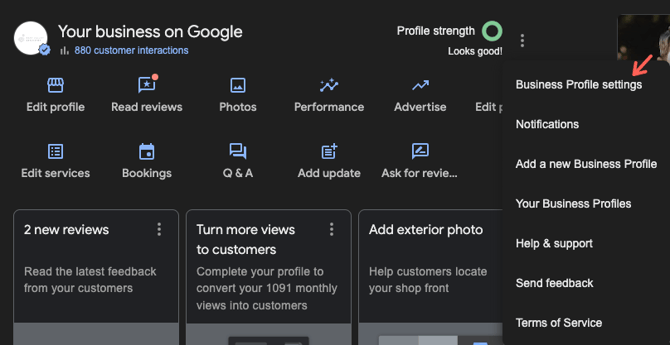
- Click 'Business Profile Settings'
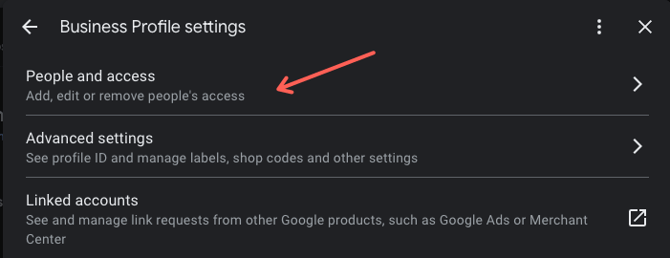
- Click ‘People and access’
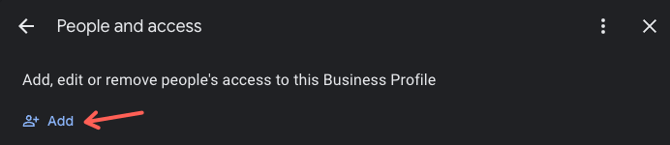
- Click ‘+ Add’
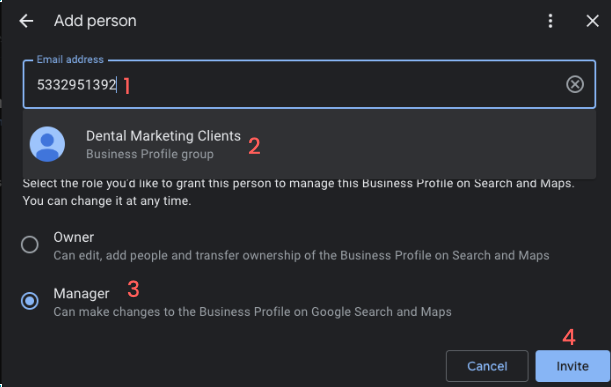
- Enter the business group ID
- Note: DentalMarketing.com is a GMB organization, so you will need to enter this business group ID to send access: 5332951392
- Note: DentalMarketing.com is a GMB organization, so you will need to enter this business group ID to send access: 5332951392
- Click on 'Dental Marketing Clients'
- Select the level of access that you would like to grant - either Manager or Owner access is fine, but only Owners can add new users
- Click ‘Add’ or ‘Invite’ to send the invitation
- If the business ID entered shows invalid, please invite team@dentalmarketing.com instead.
- If the business ID entered shows invalid, please invite team@dentalmarketing.com instead.