![DentalMarketing-Logo2-White copy.png]](https://grow.dentalmarketing.com/hs-fs/hubfs/DentalMarketing-Logo2-White%20copy.png?height=40&name=DentalMarketing-Logo2-White%20copy.png)
Introduction
The Creative Team (also referred to as the Design Team) is responsible for all client-facing creative execution at DentalMarketing.com. This includes website edits and enhancements, content implementation, SEO-driven updates, graphic and print design, and ongoing visual improvements for existing clients.
For Client Success Managers, the Creative Team is the primary resource for turning client requests and strategic recommendations into live, polished deliverables. To keep work moving efficiently, all creative requests must be clearly scoped and submitted through the Active – Creative Support Pipeline, using the correct request type and detailed instructions.
Pastel is used to collect clear, visual feedback from clients directly on their website—eliminating screenshots and long email explanations.
Purpose
This SOP explains how Client Success Managers (CSMs) should leverage the Creative Team (Design Team) to support existing clients.
The Creative Team manages:
-
Website edits and enhancements
-
Graphic and print design
-
Content revisions and implementation
The goal is to ensure creative requests are clear, properly scoped, and routed correctly to avoid delays and rework.
How Pastel Is Used
-
Every client has a Live Pastel link on their Company Profile
-
If a client requests more than 3 website edits, share their Pastel link
-
Clients leave comments directly on the site
What Happens Next
-
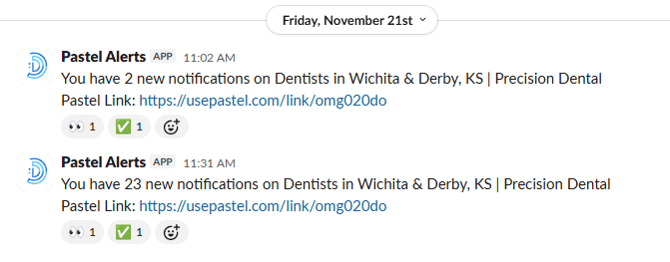
Client feedback triggers alerts in Slack: Pastel Alerts
-
A Client Support Specialist will:
-
Review the feedback
-
Create a Web Edit ticket in the Creative Support Pipeline
-
-
Client Success Managers may also submit tickets directly when appropriate
Slack Channel: Support Ticket Collab
Use #Support -Ticket-Collab when you:
-
Are unsure how to properly ticket a request
-
Need help scoping a creative request
-
Want to provide additional internal feedback on a ticket
This channel exists to prevent mis-ticketing and delays.
Who This Is For
-
Client Success Managers
-
CS Leads
-
Client Support Specialists
Tools & Pipelines Used
-
Help Desk (Active Customer Support Pipeline)
-
Active – Creative Support Pipeline
-
Slack:
-
Pastel Alerts
-
Support Ticket Collab
-
-
Google Docs (content & design inputs)
When to Use the Creative Support Pipeline
Use the Active – Creative Support Pipeline for:
-
Website edits or enhancements
-
Content updates or revamps
-
Adding scripts or modifying booking widgets
-
SEO-driven page improvements
-
Graphic or print design requests
Creative Support Request Types
1. Web Requests (Most Common)
Web requests cover:
-
SEO updates
-
Audits
-
Custom website requests
-
Single edits or multiple rounds of edits
Important:
You must define whether the site is:
-
Built by Dental Marketing
-
Webflow
-
Externally built
This determines which creative team member is assigned.
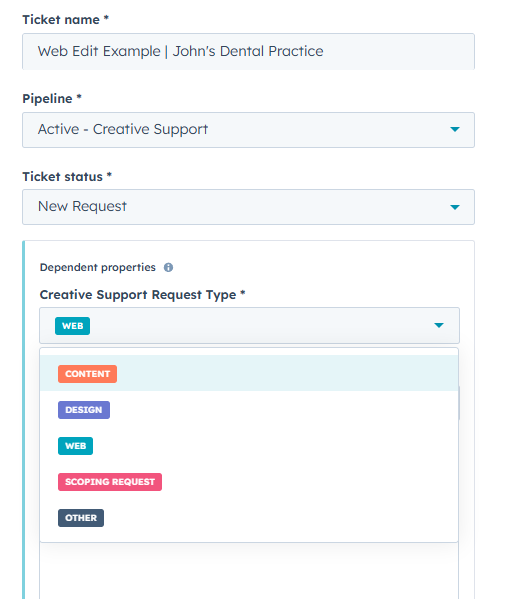
Web Ticket Example: Updating Office Hours
Scenario: Client adds Saturday hours.
How to Create the Ticket
-
Create a Creative Support ticket
-
Ticket Name:
[Update Hours – Practice Name] -
Ticket Status: New
-
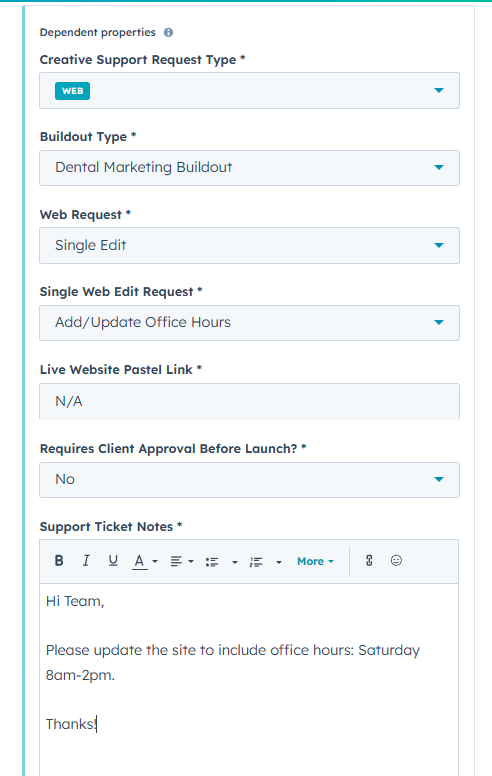
Creative Request Type: Web
-
Buildout Type: Dental Marketing
-
Web Request Type: Single Edit
-
Single Edit Dropdown: Add / Update Office Hours
-
Live Pastel Link: N/A
-
Requires Client Approval Before Launch: No
-
Support Ticket Notes (be exact):
“Please update office hours to include Saturdays from 8:00 AM–2:00 PM.”
-
Ticket Description: Update hours
-
Priority: High
-
Add:
-
Company
-
Contact
-
After Submission
-
Ticket moves to In Progress
-
Tasks are auto-assigned to Creative
-
Once complete, status moves to Closed – Ready to Share
-
You’ll receive a HubSpot notification
2. Design Requests
Design requests are for non-web creative assets, including:
-
Brochures
-
Flyers
-
In-office print materials
Reference guide:
How do I quote custom graphic designs
Design Ticket Example: Custom Brochure
-
Creative Request Type: Design
-
Design Request Category: Print
-
Print Design Type: Custom Print Design Request
-
Support Ticket Notes (detail is critical):
-
Google Doc with content
-
Dimensions (example: 4:5, 4-panel)
-
Branding (practice colors)
-
Any inspiration or references
-
-
Ticket Description: Custom brochure design
-
Priority: Low
-
Add:
-
Company
-
Contact
-
Design Workflow Notes
-
Design tickets are more iterative than web edits
-
If feedback is required:
-
Move ticket to Revisions Required
-
-
If details are missing:
-
Ticket moves to More Info Required for Completion
-
A comment will explain what’s needed
-
3. Content Requests
Use Content requests when:
-
New content is needed
-
Existing content requires SEO optimization
-
Page copy needs improvement
Best Practice
-
Always include a Google Doc
-
Be as specific as possible
-
Copy is optimized first, then implemented by Web
4. Scoping Requests
Use Scoping Requests when:
-
You’re unsure if something can be done
-
The request is complex or unclear
-
You need guidance before submitting a formal ticket
Scoping prevents delays and rework.
Ownership & Communication
-
The Client Success Manager owns all client communication related to creative requests
-
This includes:
-
Setting expectations
-
Providing updates
-
Sharing completed work
-
Creative team members do not communicate directly with clients.
Best Practices (Non-Negotiable)
-
Be extremely specific in ticket notes
-
Vague tickets may be moved to More Info Required
-
Incomplete requests delay turnaround times
-
Keep Closed – Ready to Share tickets reviewed and clean
-
Use Scoping Requests instead of guessing