![DentalMarketing-Logo2-White copy-1.png]](https://grow.dentalmarketing.com/hs-fs/hubfs/DentalMarketing-Logo2-White%20copy-1.png?height=40&name=DentalMarketing-Logo2-White%20copy-1.png)
Notes:
- Ideally, BOV should be completed by the same person who completed the initial Advertiser Verification.
- We need the client's contract with DM.com to submit as well as any advertiser verification documents they can or have previously provided (i.e. EIN document, business registration form, business licenses, etc.).
- The client's website needs to have a privacy policy on it - if that isn't present, we need the Creative team to add it before we can proceed.
Part 1 - Notification of Business Operations Verification (BOV) Requirement
- When Advertiser Verification is required for a client, we will receive an email from Google that looks like this:
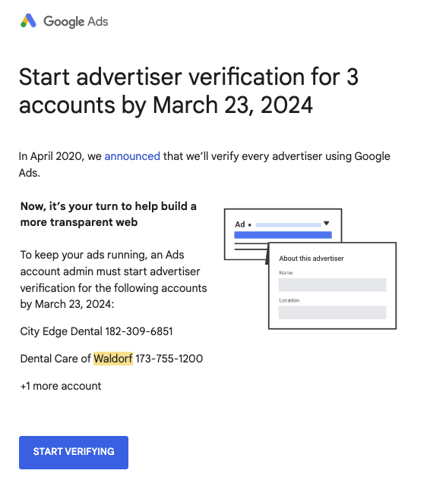
- To confirm if it is the standard Advertiser Verification that needs to be completed or Business Operations Verification (BOV), navigate to the Google Ads account and go to Tools & Settings > Billing > Advertiser Verification > If there is a section present for 'Verify Your Business Operations', then it is the BOV that is required
- Once we receive this notification from Google and confirm BOV is required, we need to add this to our TD/CSM Priority List and indicate the client name, what needs to be done, by what date (i.e. Need to complete Google business operations verification by X/X), and who the CSM is
- After this, we need to notify the CSM of this in the #dm-trade-desk-and-ms Slack channel (Note: If they prefer, they can complete BOV themselves as long as they have admin access to the Google Ads account - but it is a tedious process)
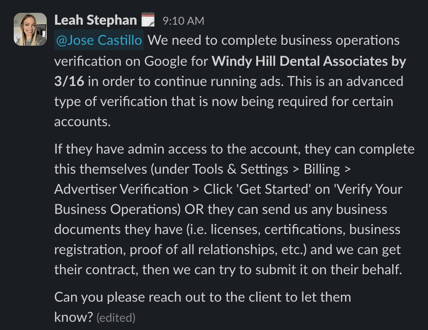
Part 2 - Submitting Business Operations Verification (BOV) Form to Google
- Note: Verify that there is a Privacy Policy page on the client's site before completing this form. If there isn't, please advise the SA that the client needs to add one first.
- Open the client's Google Ads account and go to Tools & Settings > Billing > Advertiser Verification > Under the 'Verify Your Business Operations' section, click 'Get Started'
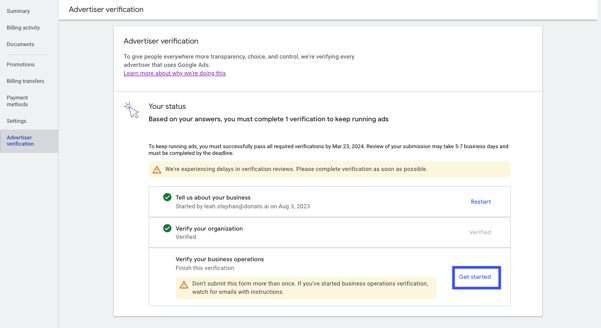
- Following the question/answer guidance below, complete all questions and prompts on the form to the best of your ability:
- Part 1 - About the Advertiser
-
1. The following questions are about your Google Ads account (customer ID)* (Please provide the customer ID if it’s not shown below.) *
-
XXXXXXXXXX
-
-
- Part 1 - About the Advertiser
-
-
-
2. And the associated website (Please provide the website if it’s not shown below.)
- WEBSITE URL
-
-
-
-
-
For the rest of this form, we’ll refer to the Google Ads account as “this Ads account”
-
3. Is the website listed in question 2 still used with this Ads account? *
-
Yes, we still use this website
-
-
-
-
-
-
4. Which of the following best reflects your use of Ads: *
-
I run ads for another organization, on behalf of the agency I work for
-
-
Who pays for the Google Ads account?
- Another business
-
Provide the legal name of the business advertised through the Google Ads account. The name you enter:
Will be used in ad disclosures accessible from ads run by this account
Must exactly match the name shown on documentation you provide
Must follow the advertiser name requirements- CLIENT NAME (per the valid Advertiser Verification document)
-
Where is this business registered?
- COUNTRY (i.e. United States of America)
-
Upload the documents listed in country requirements. You can also upload any additional documents that support your selections above. Learn how we keep your information private in Google's Privacy Policy.
- Upload the valid Advertiser Verification document (i.e. EIN document)
-
5. Is there another business that manages campaigns or campaign creation?
- Yes
-
Please provide the name of the business that manages the Google Ads campaigns, their website, and a description of the relationship.
-
https://www.dentalmarketing.com/
DentalMarketing.com is the agency that creates and manages the Google Ads campaigns for CLIENT NAME
-
-
-
-
-
-
Upload any documents that support your selections above. Learn how we keep your information private in Google's Privacy Policy
- Upload the client's contract w/ DM.com
-
-
-
- Part 2 - About You
-
6. Your name: *
- YOUR NAME
-
7. Your company name *
-
8. Your company’s street address *
-
1900 Glades Rd 4th Floor
-
-
9. Your company’s city *
-
Boca Raton
-
-
10. Your company’s Zip / Postal Code *
-
33431
-
-
11. Email address you sign in to Google Ads with *
-
YOUR PERSONAL @DONATO EMAIL
-
-
- Part 2 - About You
-
- Part 3 - About the Advertiser's Business Model and Partnerships
-
The following questions are about the company or individual advertised and their website
-
12. Please describe the company's type of business. *
-
CLIENT NAME is a dental practice that provides dental services for patients in the local area.
-
-
13. Please describe the company's business model. *
-
The company is a dental practice that provides dental services to its patients. The customers of this company are patients who book appointments for dental services.
-
-
14. Who are your customers / target audience? (Please describe both, if they’re different.) *
-
Our customers/target audience are users who are actively looking online for dental services and are located near the practice.
-
-
15. Please describe how your company interacts with your target audience. *
-
We interact with the target audience by connecting with prospective patients who have expressed an interest in dental services, scheduling appointments for them to visit our dental practice and receive the requested dental services.
-
-
16. Considering your answers above, select the business type that best reflects the company. *
- First party
-
Does a third party deliver your goods / services for you?
- No, we are a first party
-
Upload any documents that support your selections above. Learn how we keep your information private in Google's Privacy Policy. *
- Upload the valid Advertiser Verification document (i.e. EIN document)
-
- Part 3 - About the Advertiser's Business Model and Partnerships
-
-
-
17. Are any other relationships required to provide the goods and services advertised using Google, or shown on the website, such as a parent company or provider? *
- No
-
18. Does the company provide paid marketing, paid advertising, or paid lead generation services? In other words, could your company be considered an advertising agency, or an affiliate? *
- No, we're not an advertising agency or affiliate
-
Does an external marketing or advertising agency sign in to your Google Ads account?
- Yes
-
Please provide a:
Business name
Website
Description of your relationship to the marketing or advertising company that manages this account:
-
-
-
-
-
-
DentalMarketing.com - https://www.dentalmarketing.com/ - DentalMarketing.com is the agency that creates and manages the Google Ads campaigns for CLIENT NAME
-
-
Please provide documentation that illustrates or explains your relationship with the businesses listed above. *
- Upload the client's contract w/ DM.com
-
-
-
- Part 4 - Body Questions
-
19. Describe how the target audience receives the goods or services promoted in your ads. *
-
The target audience receives the services promoted in our ads by booking an appointment at the practice and then coming in for the scheduled appointment to receive the requested dental services.
-
-
20. Who creates ad content for this Ads account , including its ads, targeting, and keywords?
-
Another business creates the ad content
-
- Please provide a:
Business Name
Website
Description of your relationship to the creators of the ad content.-
DentalMarketing.com - https://www.dentalmarketing.com/ - DentalMarketing.com is the agency that creates and manages the Google Ads campaigns for CLIENT NAME
-
-
Upload any documents that support your selections above. Learn how we keep your information private in Google's Privacy Policy. *
- Upload the client's contract w/ DM.com
-
- Part 4 - Body Questions
-
-
-
21. Who creates the content of your website?
- We create our website content
-
22. Who would a customer hold responsible for non-fulfillment of goods or services advertised through Google?
- My company
-
23. Do any other parties sign in to the Ads account? *
- Yes, others sign in to the Ads account
-
Please provide a:
Business name
Website
Description of your company’s relationship to all other parties that sign in to the Ads account-
DentalMarketing.com
https://www.dentalmarketing.com/
DentalMarketing.com is the agency that creates and manages the Google Ads campaigns for CLIENT NAME
-
-
How do these parties use the Ads account?
-
DentalMarketing.com
Our agency team at DentalMarketing.com signs into the Ads account to manage the Google campaigns and make optimizations as needed
-
-
Upload any documents that support your selections above. Learn how we keep your information private in Google's Privacy Policy *
- Upload the client's contract w/ DM.com
-
-
-
-
-
24. Are any other relationships required to provide the branding used in ads or shown on the website? This includes, but isn’t limited to, logos or names of products, franchising rights, or authorized dealer relationships. *
- No
-
25. Who pays for the Google Ads account? *
-
CLIENT NAME, the advertiser, pays for the Google Ads account.
-
-
26. Is your company required to have any of the following types of licenses or certifications to provide the products or services you advertise?
- No additional licensing is required
-
27. How does your company protect its current and potential customers' personal information?
-
CLIENT NAME protects its current and potential customers' personal information by following the laws enforced by HIPAA and not sharing or disclosing personal information with anyone else.
-
-
Please include a link to your privacy policy.
- PRIVACY POLICY URL
-
28. Attach any additional documents that support the claims made above.
- Upload the valid Advertiser Verification document (i.e. EIN document)
-
-
-
- Part 5 - Closing Questions
-
29. Do you have any other comments or information that may be important?
I, NAME, an employee of DentalMarketing.com am submitting this on behalf our our client, CLIENT NAME, per their authorization and request.
-
- Part 5 - Closing Questions
- Click 'Submit' to submit the BOV form to Google
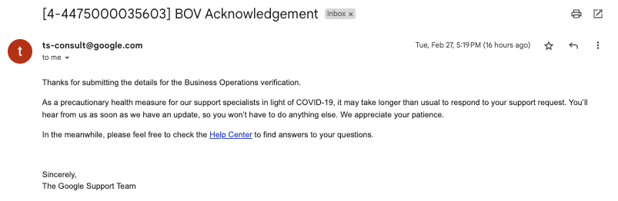
- Once the completed BOV form has been submitted, you should receive an email saying that it's been received (Note: It may take up to 5-7 business days for this form to be reviewed and a decision to be made)
-
- If BOV was approved, you will receive another email from Google saying that we've "successfully verified CLIENT NAME (XXX-XXX-XXXX)" (Note: You can double-check in the Google Ads account to make sure there are no more pending Advertiser Verification steps)
- Go to the TD/CSM Priority List and move that line item to the 'Resolved Items' tab
- Then, go back to the #dm-trade-desk-and-ms message thread and let the CSM know that "BOV was accepted and CLIENT is now a verified advertiser on Google" and include a screenshot
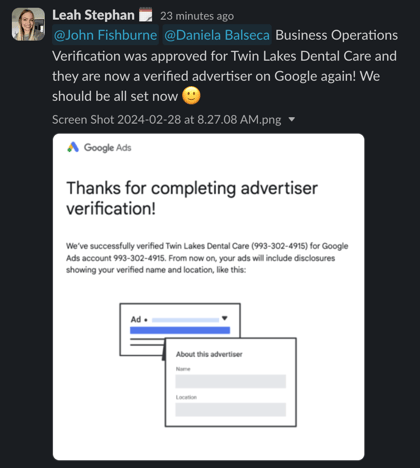
- Then, go back to the #dm-trade-desk-and-ms message thread and let the CSM know that "BOV was accepted and CLIENT is now a verified advertiser on Google" and include a screenshot
- Go to the TD/CSM Priority List and move that line item to the 'Resolved Items' tab
- If BOV was approved, you will receive another email from Google saying that we've "successfully verified CLIENT NAME (XXX-XXX-XXXX)" (Note: You can double-check in the Google Ads account to make sure there are no more pending Advertiser Verification steps)
-
- If the BOV is not approved, you will receive another email from regarding the issue and will have the opportunity to re-submit the form again with the proper details
- Provide an update to the CSM in the #dm-trade-desk-and-ms message thread and request any additional documents needed from the client
- If the BOV is not approved, you will receive another email from regarding the issue and will have the opportunity to re-submit the form again with the proper details