![DentalMarketing-Logo2-White copy-1.png]](https://grow.dentalmarketing.com/hs-fs/hubfs/DentalMarketing-Logo2-White%20copy-1.png?height=40&name=DentalMarketing-Logo2-White%20copy-1.png)
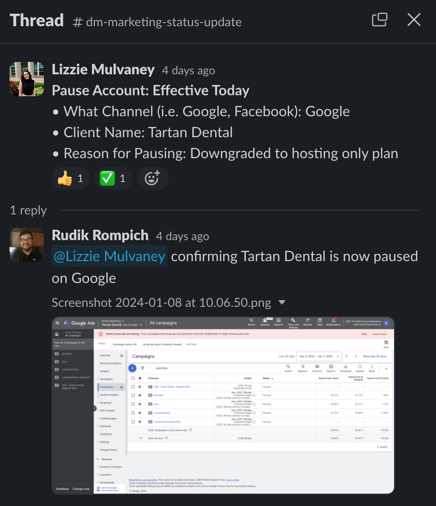
If we get a marketing-status-request in Slack from a CSM to pause an account because they are "downgrading to hosting only", complete the following steps:
- In Google Ads, pause all active campaigns
- Take a screenshot of the pause campaigns, share in the Slack thread to the CSM, and verbally confirm that "X is now paused on Google Ads"
- Next, disable the budget pacing scripts in Google Ads
- Do this by going to Tools & Settings > Bulk Actions > Scripts > Under Actions, click to open the drop-down menu > Select 'Disable' for each script that is currently enabled on the account (generally we have 2 scripts enabled for each account)
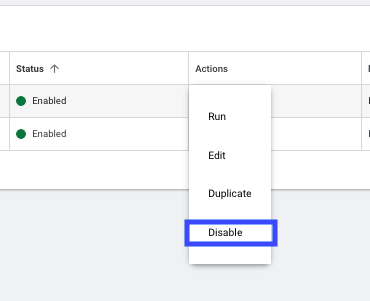
- Do this by going to Tools & Settings > Bulk Actions > Scripts > Under Actions, click to open the drop-down menu > Select 'Disable' for each script that is currently enabled on the account (generally we have 2 scripts enabled for each account)
- In Google Ads at the MCC-level, hide the account
- Do this by going to Accounts > Performance > Search for the account name and select it > Edit > Click 'Hide'
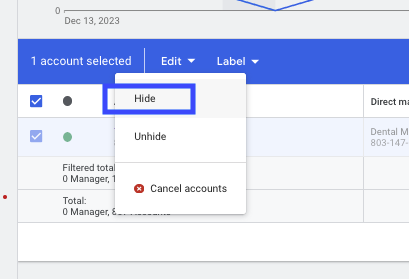
- Do this by going to Accounts > Performance > Search for the account name and select it > Edit > Click 'Hide'
- In Optmyzr, unlink the account
- Do this by searching for the account in the main dashboard > Click the 3 dots on the right > Select 'Unlink Account'
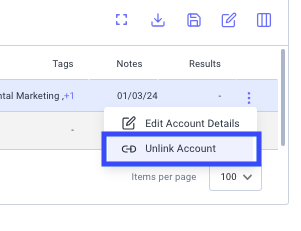
- Do this by searching for the account in the main dashboard > Click the 3 dots on the right > Select 'Unlink Account'