![DentalMarketing-Logo2-White copy-1.png]](https://grow.dentalmarketing.com/hs-fs/hubfs/DentalMarketing-Logo2-White%20copy-1.png?height=40&name=DentalMarketing-Logo2-White%20copy-1.png)
Pull Underperforming Accounts
Each Friday, the List of Underperforming Accounts is shared in the customer-marketing-digital Slack channel.
- Open the Trade Desk + SA Priority List spreadsheet and navigate to the "Underperforming Accounts" tab
- Insert new rows above last week’s table and copy/paste last week’s table into these rows
- Clear the previous table data by deleting the information and cleaning the cells
- Update the date in the title of the new table created
-
Open Google Ads at the MCC level > Select 'Accounts' > 'Performance' > Set the date range to the last 30 days > Apply the following filters:
-
- Account status: Active
- Level: Directly linked
- Cost: Greater than $0.00 (Converted)
-
- Sort the Cost/Conv column from highest to lowest
- Copy the accounts from the dashboard with a Cost/Conv greater than $200 USD (or $275 CAD)
- Note: Remove any account that is recently cancelled (i.e. assigned to Magen), currently paused, launched 2 weeks ago or less, or is not actively running our campaigns
- Copy the accounts from the dashboard with a Cost/Conv greater than $200 USD (or $275 CAD)
- Update the Strategic Advisor (SA) for the account
- For accounts launched within the last 90 days, select 'Yes' in the 'Learning Phase (Launched less than 90 days ago)' column
- In the Notes column:
-
- For accounts launched within the past 90 days, include the launch date and note whether they launched less than 30, 60, or 90 days ago
- Specify if the account is a Home Page LP, Digital LP, Full Site or a client-owned site
- Indicate if the account is Limited by Budget (no need to note if it's not)
- List the monthly budget
- Search the sheet to see how many times each account has been on the list previously and update the Times on List column accordingly
- Schedule a message for the following Monday at 9:00 AM ET in the #dm-trade-desk-and-ms Slack channel that tags the channel and shares a link to the underperforming accounts
- For example:
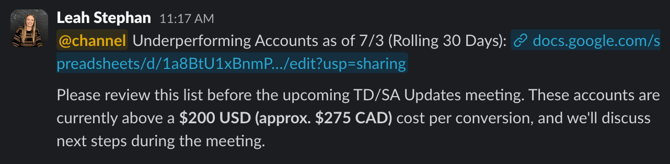
- For example:
- Finally, for easy review on the TD/SA Updates call, sort the table alphabetically by SA, then by account name
Review + Add Recommendations
- Review Recent Performance + Add Initial Notes
- On Monday, review the last 7 days of performance on Optmyzr for all accounts flagged as underperformers on Friday
- If an account is trending up (below our thresholds), add a note indicating that and a dash on the right to indicate that no further changes are needed
- If an account has 0–1 conversions and no note about missing GTM scripts, add a optimization note to QA conversion tracking
- On Monday, review the last 7 days of performance on Optmyzr for all accounts flagged as underperformers on Friday
- Identify Optimizations
- For accounts not trending up, add around 2–6 optimization recommendations per account in the TD Recommendations + Action Items column
- Note: At this stage, you are only documenting recommendations, not implementing changes
- Examples of potential optimizations:
- Adjust keyword bids
- Add new keywords
- Pause underperforming keywords
- Pause underperforming ads
- Remove underperforming location targets
- Expand or decrease location radius
- Review search terms
- If an optimization requires SA or client approval (i.e pausing a focus service, removing a prioritized location target, or adding a P. Max campaign), bold it and start with “We recommend…” or confirm with the SA in Slack before adding it as a "TD will..." optimization recommendation
- If the change is already approved or clearly okay, phrase it as “TD will…”
- For accounts not trending up, add around 2–6 optimization recommendations per account in the TD Recommendations + Action Items column
Assign to Team for Implementation
- Once all recommendations have been added, delegate each account to a team member for implementation and add a dash to the right to indicate the account changes have been assigned
- Note: We should only implement the "TD will" recommendations right away. The "We recommend" recommendations require SA or client approval so we will propose it and if they agree, then we should get a task for us to make those specific changes