![DentalMarketing-Logo2-White copy-1.png]](https://grow.dentalmarketing.com/hs-fs/hubfs/DentalMarketing-Logo2-White%20copy-1.png?height=40&name=DentalMarketing-Logo2-White%20copy-1.png)
Note: FB Business Manager invites should ONLY be sent by individuals on the Paid Search Team.
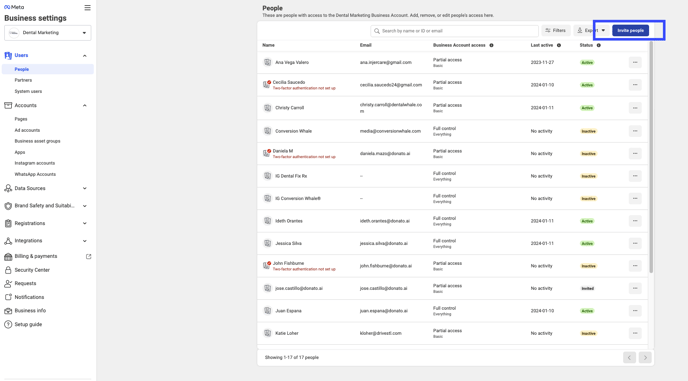
- Go to our Dental Marketing FB Business Manager settings > Click Users from the left-hand side option > Select People > Click "Invite People" >
-
- Enter the personal @donato email for the team member that you'd like to add > Click "Next"
- It defaults to "Basic" access, which is what is needed for anyone that just needs limited access like the CSMs, Sales teams, etc. > Click "Next"
- Under Ad Accounts, select the specific ad accounts that the individual should have access to
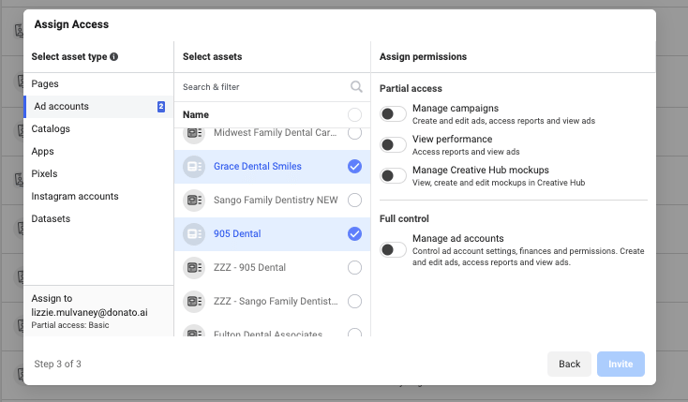
- Under Assign Permissions, select "view performance" only (so they cannot make any changes, but can still view the account performance as needed)
- Click "Invite" to send the invite
Accept Invite
- The team member will receive the FB invite at their personal @donato email. From there, they can simply click to accept the invite from the email and then it will prompt them to log into FB - they can log in to their personal FB account or they can choose to create a new FB account using their business email instead, if preferred.