![DentalMarketing-Logo2-White copy-1.png]](https://grow.dentalmarketing.com/hs-fs/hubfs/DentalMarketing-Logo2-White%20copy-1.png?height=40&name=DentalMarketing-Logo2-White%20copy-1.png)
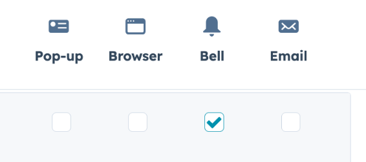
All other bell notifications should be turned OFF (unchecked).
Notification settings: https://app.hubspot.com/notification-preferences
1. Calling
- Inbound call activity has been logged
Get notified when an inbound call to your HubSpot phone number has been logged. - Missed calls
Get notified when an inbound call to your HubSpot phone number has been missed. - Voicemails
Get notified when someone leaves a voicemail on your HubSpot phone number.
2. Chat and Email Conversation
- Email conversation assigned to you
Get notified when an email conversation is assigned to you. - Email conversation reassigned to you
Get notified when an email conversation is reassigned to you. - Internal Comment Mentions
Get notified when a teammate @mentions you in an internal comment from an email or chat conversation. - Email conversation reply
Get notified when someone replies to an email conversation assigned to you.
- Comments on activity you're involved in
Get notified when there's a new comment on an activity you own, commented on, or were mentioned in.
- Comments you're mentioned in
Get notified when a teammate @mentions you in a comment.
4. Contacts and Companies
- You’re mentioned on a company record
Get notified when a teammate @mentions you in a note or logged activity on a company record. - You’re mentioned on a contact record
Get notified when a teammate @mentions you in a note or logged activity on a contact record.
5. Custom Objects
- You’re mentioned on a custom object record
Get notified when a teammate @mentions you in a note or logged activity on a custom object record.
6. Deals
- You’re mentioned on a deal record
Get notified when a teammate @mentions you in a note or logged activity on a deal record.
7. Tasks
- Content task assigned to you
Get notified when a teammate assigns a content task to you with the calendar tool. You’ll also get a notification when you’ve completed the task. - Task assigned to you
Get notified when a teammate or automation tool assigns a task to you. - Task reminder
Get notified when a task is due if you set a reminder for it, or if you turned on reminders in sequence settings. - You’re mentioned on a task record
Get notified when a teammate @mentions you in a note or logged activity on a task record.
8. Tickets
- Comments on tickets you’re involved in
Get notified when there's a new comment on a ticket you own, commented on, or were mentioned in. - Help Desk ticket assigned to you
Get notified when a help desk ticket is assigned to you. - Ticket assigned to you
Get notified when a ticket is assigned to you. - Ticket comments you’re mentioned in
Get notified when a teammate @mentions you in a comment on a ticket. - You’re mentioned on a ticket record
Get notified when a teammate @mentions you in a note or logged activity on a ticket record.