![DentalMarketing-Logo2-White copy-1.png]](https://grow.dentalmarketing.com/hs-fs/hubfs/DentalMarketing-Logo2-White%20copy-1.png?height=40&name=DentalMarketing-Logo2-White%20copy-1.png)
An easy guide to the types of websites and landing pages we build, their main pages and the parts every page is made of. For the meaning of any term, see Website Glossary and Terminology.
Types of websites we build
- Full Website: the practice's complete website, with the Home Page, the Core Pages, a page for each main service and the supporting pages. It's built in three steps: Home Page Mockup, Website Pre Production and Website Production. It can be for a start-up practice (no current website), a refresh of a website we built before, or a redesign of a website from another agency. Examples: huronvalleydental.com, www.valleyviewdentallogan.com, and completesmilesut.com (multi-location).
- Home Page LP: the Home Page shown on its own on the client's domain while the full website is being built. It's temporary.
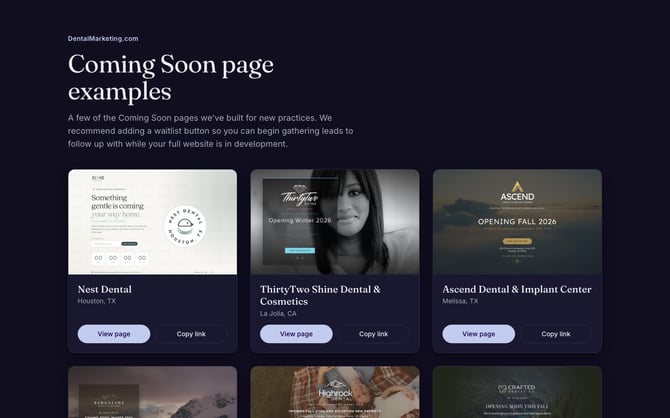
- Coming Soon LP: a simple page on a new practice's domain before the practice opens or the website launches. Examples: coming-soon-examples.pages.dev.
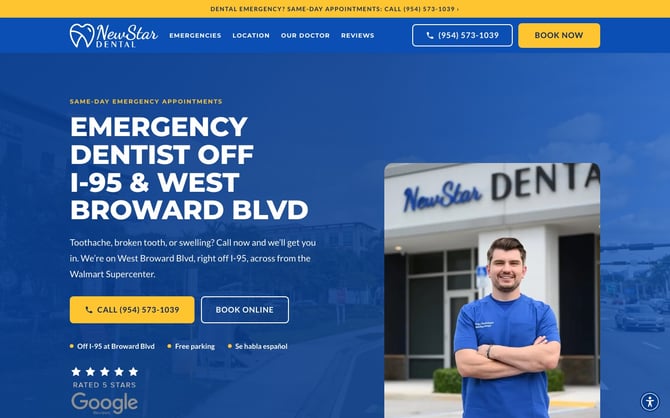
- One Page LP: a single landing page for one service (for example dental implants or emergency care), usually for Google Ads. It lives at <client>.dentist-near-me.com/<service>/. Examples: newstardental.dentist-near-me.com/emergency, bridgeviewdental.dentist-near-me.com/dental-implants.
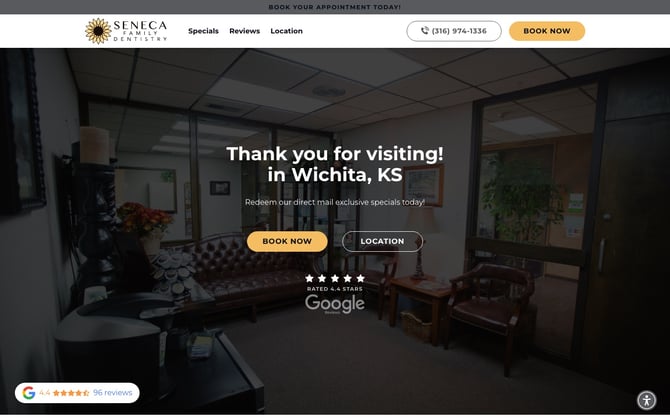
- Direct Mail LP (Mail LP): part of a Direct Mail campaign. The mailer's QR code opens it, so patients can see the offers and book online. It's short, with only the most important information, and lives at promo-<client>.dentist-near-me.com. Examples: promo-senecafamilydentistry.dentist-near-me.com, promo-riverwestdentalid.dentist-near-me.com.
- Dashboard LP: a Direct Mail landing page built in the client Dashboard instead of a code repository.
Older landing pages used "visit" and "offer" addresses. They're being moved to the new addresses one at a time.
What they look like
One Page LP (NewStar Dental, emergency):
Direct Mail LP (Seneca Family Dentistry):
Coming Soon LP (our examples page, coming-soon-examples.pages.dev):
Main pages
All our websites have 5 main links in the navigation. We keep only these, so the navigation is easy and not overwhelming:
- Home: the first page visitors see, with an overview of everything the practice offers: an attractive hero that makes them keep scrolling, the dentists, testimonials, office photos, main services, location and the insurance form.
- About: tells visitors and search engines about the office as a whole: its philosophy, dentists, amenities, mission and vision, and everything that makes a visit pleasant. Some doctors want to replace it with a doctors page; we don't recommend it. There are plenty of links to the doctor pages across the website, and patients' reviews show they value the whole experience, from the moment they walk in to the moment they leave. Search engines also expect a reputable website to have this information.
- Services: lists every service the practice offers (see Services below).
- Insurance: payment, financing and insurance options. We use the word "Insurance" because it's what patients search for most, but it can become "Financing" or "Financing Options" for higher-end or cosmetic practices whose services insurance doesn't cover.
- Location: where the office is, when it's open and how to contact it. On multi-location websites (for example completesmilesut.com), each office has its own Location page with its hours, directions, patient forms, office tour and highlights.
The Core Pages designed in Pre Production are Home, About, Insurance, Services and one example service page, plus Location on multi-location websites. The other service pages and locations are built from the same designs.
Other pages, linked from the footer and inside the content when the practice needs them: Our Team, doctor pages, Your First Visit, Our Technology, Office Tour, Testimonials, Review Us, New Patient Specials, FAQ, Blog, Privacy Policy, Disclaimer, Accessibility Statement and Thank You.
Parts of our websites
Every page is made of these elements. Here is the top of a full website (Valley View Dental) with its parts numbered:
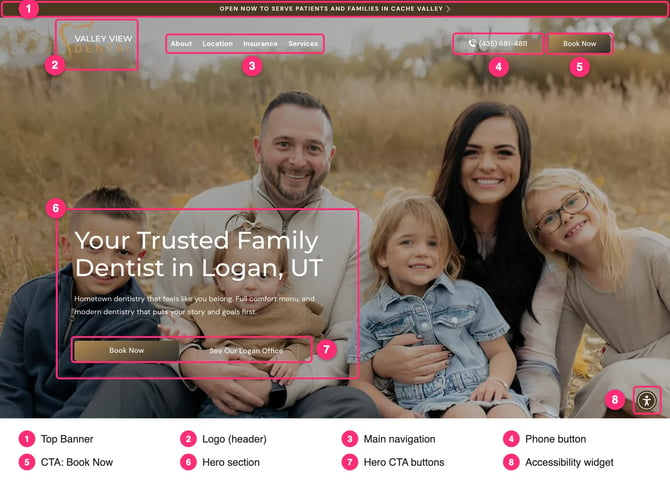
- Top Banner: a banner on the Home and service pages that highlights an offer or a special feature. Clicking it opens the booking link or the booking form.
- Header: the logo, the navigation (menu), a phone button and the main CTA, which is always booking.
- Footer: works as a sitemap, with the contact and social information, the secondary navigation (every link that isn't in the header) and the office hours.
- Sections: each block of content and images that makes up a page. For example, the Home Page has a hero, a testimonials section, a meet our doctors section, an office tour slider, a main services section and an insurance form.
- Booking: every Book button opens the practice's online booking link. If the practice has no online booking, it opens our booking form instead.
- Reviews: a Google rating badge (turned on once the practice's Google Place ID is added) and a floating Google reviews widget.
- Forms: the booking form, the "Do You Take My Insurance?" form and the Reputation Management form ("How Did We Do?"). They all go to the Thank You page and send the lead to the practice's Email for Leads.
- Typeform quizzes: lead-magnet quizzes ("Take Our 2-Minute ___ Quiz") on the matching service pages.
- Accessibility widget: the UserWay button, on every page.
Specials
Special offers are important for attracting new patients, and most of our practices use them. We show them in several places and on a dedicated New Patient Specials page.
- On landing pages, the specials section is on the main page.
- On full websites, specials show as badges in the main services section. We add a full specials section when the client asks for it, or when it helps, especially for practices that want to market themselves as affordable.
Links, buttons and CTAs
- Link: an element that performs an action, most often going to another page. It can also open a pop-up (modal), jump to a section of the same page (an anchor), open an outside website such as social media, or go to the next slide.
- Button: a styled link used to highlight something important, with its own background or border.
- CTA (Call to Action): the most important buttons on the website, in a color that stands out from other buttons and the background. On our websites the CTA is always booking ("Book Now"), and the button text is the same everywhere. Start-up practices that aren't open yet use "Follow Us". We don't use the CTA color on other elements, so visitors aren't confused.
- Anchor: a link that goes to a section on the same page.
Services
Our websites have two types of services:
- Main services: the services patients search for most, which vary by practice. Each has its own section on the Services page and its own page, designed like a landing page so it can be used in paid ads. A service page covers what the treatment includes, the steps, financing options, an FAQ and the location.
- Secondary services: services the practice offers that patients ask for less. They're listed in the Other Services section of the Services page, sometimes with a shorter, simpler page of their own and sometimes only mentioned.